MyHealDeskMyHealDeskHelp
SrpskiLog inStart free
  • Booking an appointment
  • Several services in one booking
  • Recurring appointments
  • Day, Rooms, Week, Month and List views
  • Moving bookings by dragging (Rearrange)
  • Blocking time
  • Filtering the calendar
  • Completing, cancelling and no-shows
  • Cancelling or a no-show without charging
  • Recording a therapy session
  • Exporting appointments (CSV)
  • Calling or messaging a patient from a booking
  • Opening the patient's file from a booking
  • Every room on one screen
  • Google Calendar
HelpCalendar

Opening the patient's file from a booking

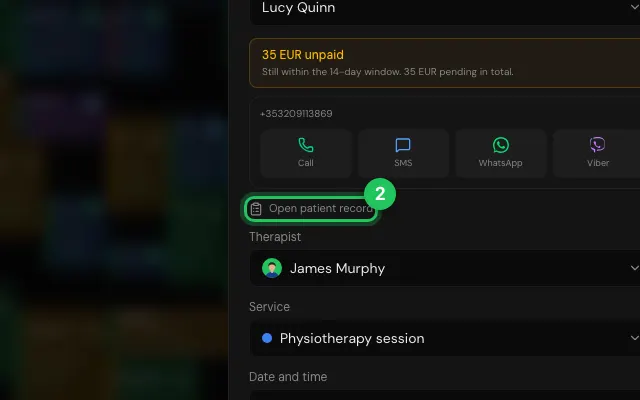
Open patient record opens the file over the calendar; closing it brings you back where you were.

How to use it

  1. 1

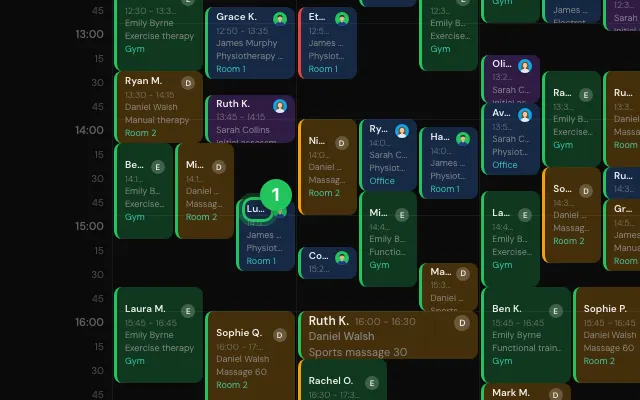
    Open the booking.

    Step 1: Open the booking.
  2. 2

    Press Open patient record.

    Step 2: Press Open patient record.
Open it in MyHealDesk

Opens this in the dashboard's Help, with Show me.

Something missing or unclear? Suggest a feature

Ask an AI about it: Ask ChatGPT Ask Claude Read this page as markdown

PreviousCalendar / Calling or messaging a patient from a bookingNextCalendar / Every room on one screen
MyHealDesk

Clinic management software for physiotherapy, rehabilitation and sports therapy.

App StoreComing soon
Get it on Google Play

Product

  • Features
  • Pricing
  • How it works
  • FAQ

Account

  • Log in
  • Sign up
  • Affiliate ($100/referral)

Legal

  • Privacy
  • Terms

© 2026 MyHealDesk

MyHealDesk